Client app
Each client can use their own PulseKit app view from a phone or desktop browser. This is where they see what to do today and record their progress. It is branded with your business name and colour.
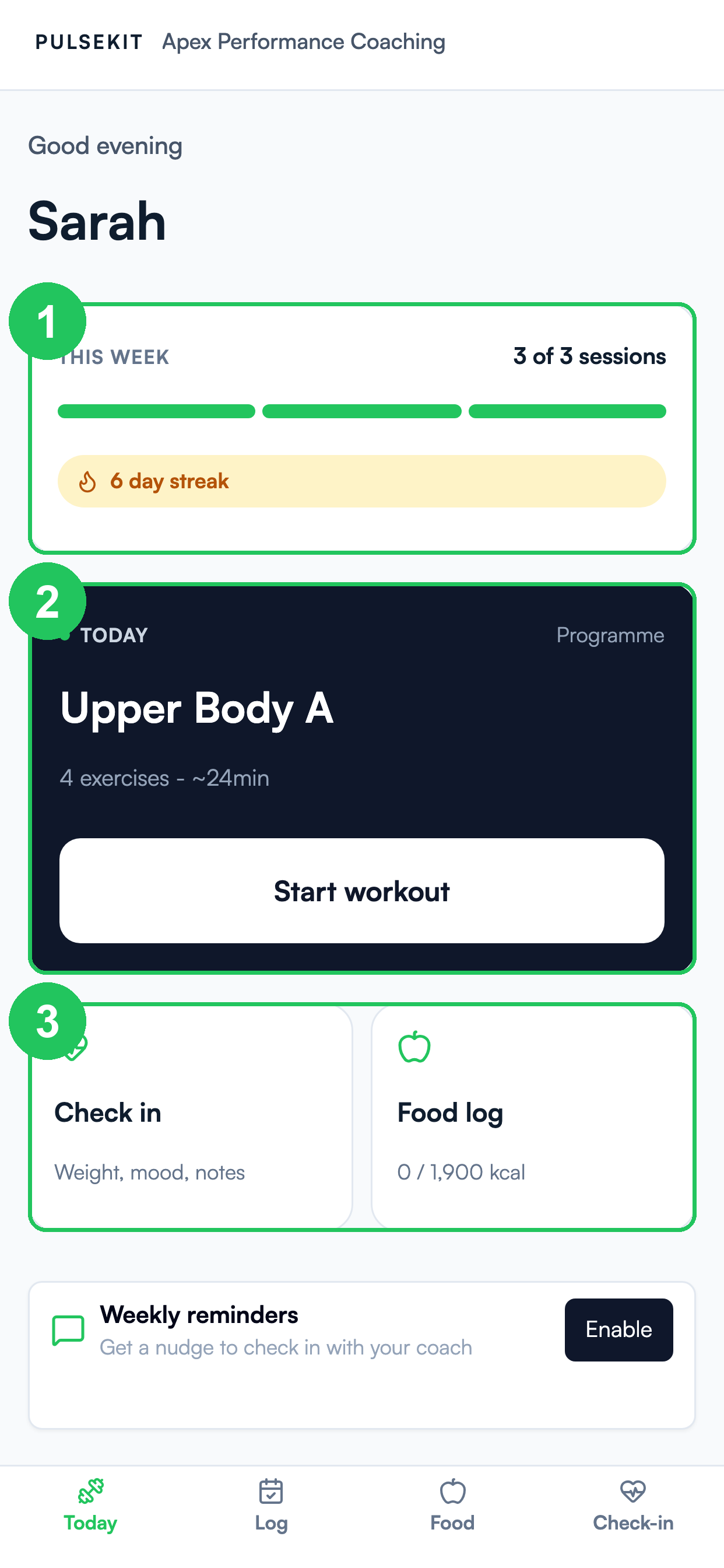
- This week - sessions completed against the plan, plus their current streak.
- Today's workout - the next session with a one-tap Start workout.
- Quick actions - jump straight to a check-in or the food log.
The bottom bar lets clients switch between Today, Log, Food, and Check-in.
What clients can do
- See today's session and upcoming training.
- Mark exercises and habits as complete.
- Submit check-ins.
- Add food diary entries.
- Review targets and progress.
Sharing the client app
Open the client in PulseKit and use their client app link. Share that link with the client through your normal message channel.
What to tell clients
Tell clients to save the link somewhere easy to find. If they use it on a phone, they can bookmark it or add it to their home screen from their browser menu.
If a client cannot open their app
- Re-send their latest client app link.
- Check that they are opening the full link, not a shortened or copied part of it.
- Ask them to try a different browser if their current browser blocks the page.